
One Wishlist for All Your Wishes,
From Any Store
Save anything from Amazon, Walmart or any brand you love. Share one link, family reserves without signing up, and you never see what they picked.


- Since 2015
- Saved from 10,000+ stores
- Free, no ads
- iPhone, iPad, Android & web
Why Giftbuster
What is the easiest way to share a wishlist with family?
Make a list for yourself or each child, text one link, and relatives reserve what they’ll buy. Free on iPhone, Android and the web.
Every shop, one list
Big retailers and small independent shops, saved side by side.
No sign-up for givers
Relatives open your list in any browser and reserve a gift with no app or account.
Surprises stay surprises
You never see what was reserved. Everyone else does, so no duplicates.
Sale badges
See when something on your list gets cheaper, and which items sold out.
How it works
How does Giftbuster work?
You save items, share one link, and family reserves gifts so nobody doubles up.
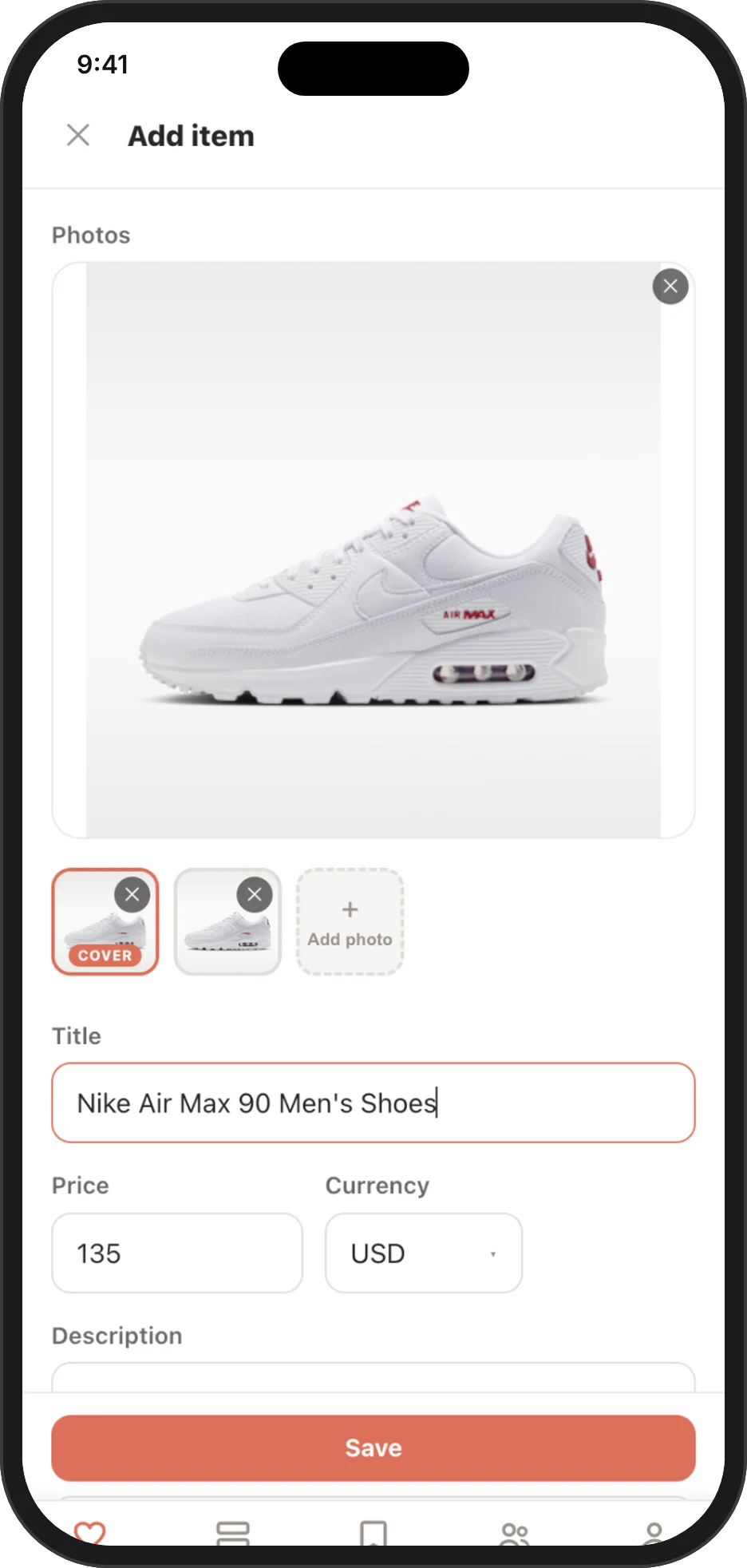
Step 1
Save what you love
Use Share → Giftbuster in your browser or paste a link. Name, photo and price fill in automatically.
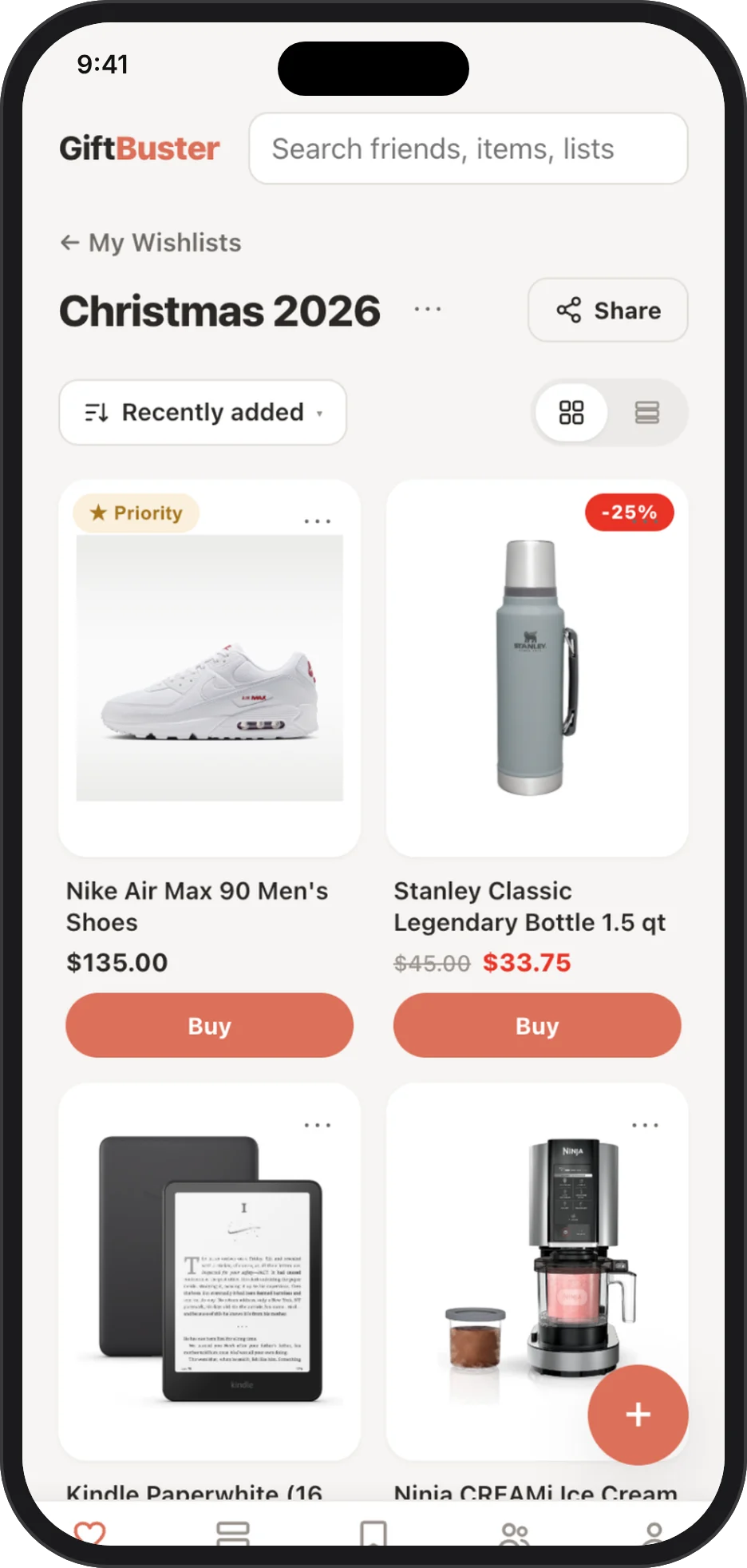
Step 2
Share one link per list
One list for you, each child, a wedding or a birthday. Text the link to the family group.
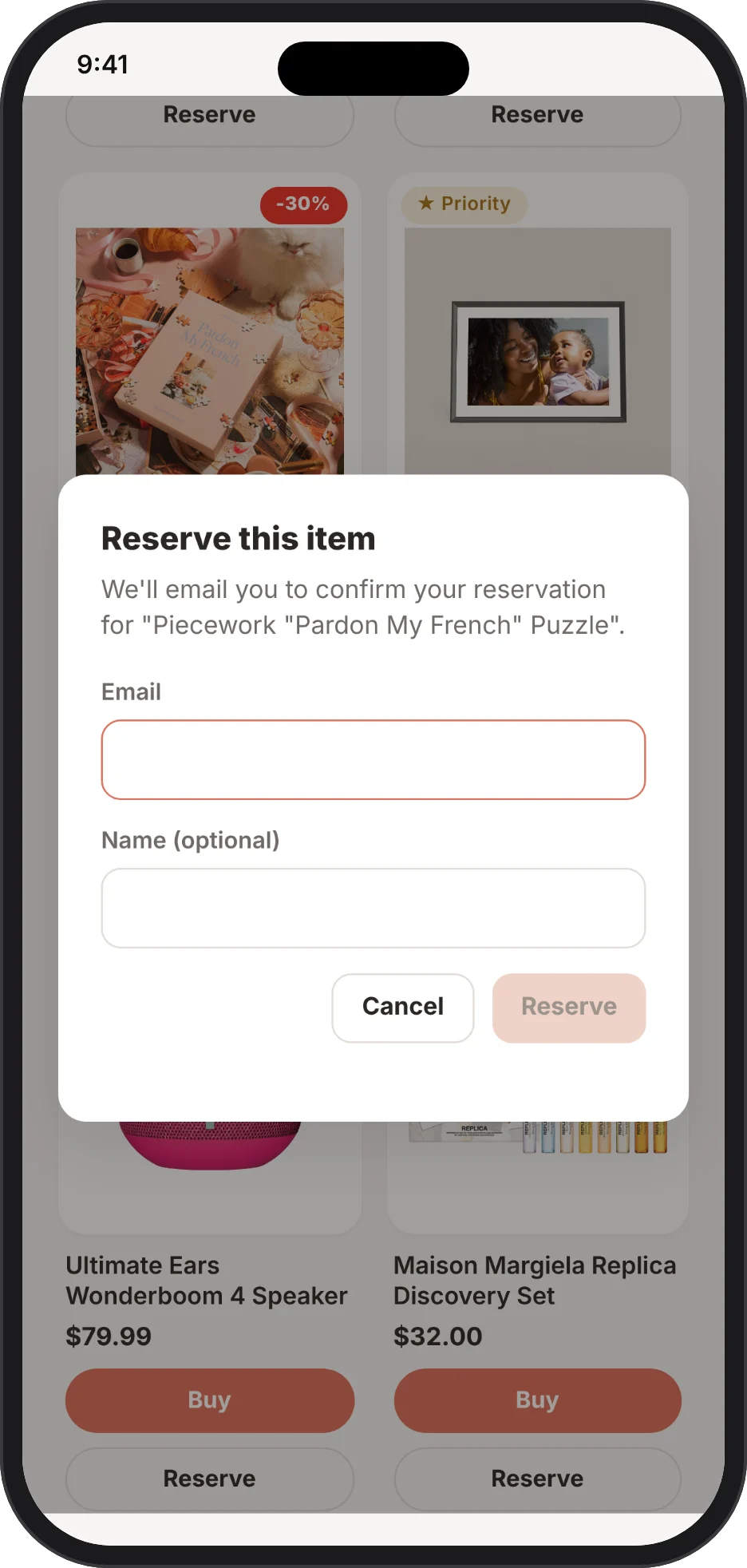
Step 3
Family reserves, duplicates disappear
Relatives tap Reserve and buy anywhere. Others see it’s taken. You stay surprised.
Features
What can you do with Giftbuster?
Save in one tap, keep a list for everyone and share each one with a single link, on every device.
Save in one tap
Paste a link or use Share. Name, photo and price fill in automatically.
Copy from friends
Love something on a friend’s list? Save it to yours.
Multiple lists
You, each child, a birthday, a wedding, a new home.
Collaborators
Let a partner you follow add and edit items on a list.
Guests without an account
Reserve in any browser and confirm by email.
Hidden reservations
The list owner never sees what was reserved.
Price tracking
Sale badges show the discount; sold-out items are marked.
Priority
Mark favorites; add size or color in the description.
Private lists
Keep any list private, or your whole account in the app.
Everywhere
iPhone, iPad, Android and web, always in sync.
Loved by families since 2015 · 4.4★ from 1,400+ App Store ratings
What do families say about Giftbuster?
Families say Giftbuster makes sharing lists and reserving gifts easy.
★★★★★
“Honestly the best gift managing app I’ve ever used. I’ve used Giftful and many others but this one outshines them…”
Stazziee · App Store ★★★★★
“Made my wish list and my friends knew exactly what to get me.”
Shriya1612 · App Store ★★★★★
“Very easy to share with others. Makes Christmas planning a breeze.”
CaeBaum07 · App Store ★★★★★
“Really excited about the reserve gift option so no one gets double of the same thing they wanted.”
Joeydonald · App Store ★★★★★
“I have tried multiple apps for making my Christmas list and nothing has been easier than clicking a button in Safari and the item popping up in the app!”
DiamondDuck101 · App Store ★★★★★
“It’s great to use between family and makes gift idea lists such an easy thing!”
dese M. · App Store ★★★★★
“Really great for the whole family to see what others want for Christmas or their birthdays. Saves time and disappointment for everyone.”
Glady2051 · App Store ★★★★★
“Used it for our wedding and it was so easy for our guests to use and really convenient for us!”
Hansenloo004 · App Store
Use cases
Who uses Giftbuster?
Families, parents and couples use Giftbuster for holidays, kids’ lists, birthdays and registries.
Christmas for the whole family
Everyone shares one link, reserves what they buy, and nobody doubles up.
Kids’ lists for grandparents
Parents run a list per child; grandparents reserve in the browser, no app needed.
Birthdays all year
Keep a running list so friends always know what you’d love.
Weddings & housewarmings
A free registry with items from all your favorite shops.
Leaving Amazon Wish List
One list from every store, and guests don’t need an Amazon account.
Your personal shopping bookmarks
Not just for gifts: save what you want to buy later, all in one place, and see when the price drops.
Compare
How does Giftbuster compare to other wishlist apps?
Giftbuster lets givers reserve without an account and hides reservations from you, for free.
| App | Any store | Givers without account | Hidden reservations | Price alerts | Free, no ads |
|---|---|---|---|---|---|
| Giftbuster | Yes | Yes | Yes | Yes | Yes |
| Amazon Wish List | No Amazon only | Partly | Yes | Yes | Yes |
| Elfster | Yes | No | Yes | Partly | Ads |
| Giftster | Yes | Partly | Yes | No | Ads |
Checked November 2026. See the full comparison of 12 wishlist apps →
Compare: Best wishlist apps 2026 · Giftful alternatives · Amazon Wish List alternative · How to avoid duplicate gifts
Gift ideas
Need gift ideas?
Our gift guides are based on what people actually save to wishlists.


FAQ
What do people ask about Giftbuster?
Is Giftbuster free?
Yes. Giftbuster is completely free on iPhone, iPad, Android and the web. There is no paid plan.
Do my family and friends need an account or the app?
No. People you share your list with can open it in any web browser. They can even reserve a gift without creating an account: we email them a link to confirm the reservation.
Can the list owner see what I reserved?
No. The person who made the list never sees who reserved what, or whether anything was reserved at all. Other guests do see reserved items, so the surprise is kept and duplicates are avoided.
Can I add items from any website, not just Amazon?
Yes. Giftbuster works with any online store, including Amazon, Target, Walmart, Etsy, Sephora, Nike and small independent shops. If a page can't be read automatically, you can still add the item by hand.
Does Giftbuster ask for my address?
No. Giftbuster never asks for your home or shipping address, so it can't be shown to anyone. You decide whether and how to share an address with the people buying for you.
Can I use Giftbuster on the web?
Yes. Everything you can do in the app, including creating lists, adding items, sharing and reserving, also works in any browser at giftbuster.app.
Does Giftbuster track prices and sales?
Yes. Giftbuster checks the prices of items on your lists and shows a Sale badge with the discount when something gets cheaper. It also marks items that are sold out, so neither you nor your family waste time on them.
Can two people manage one list?
Yes. Open the list, tap ⋯ next to its name and choose Collaborators (you need to follow each other). Collaborators can add, edit and remove items, which is handy for couples planning a registry or parents managing a child's list. Like you, they never see what has been reserved.